For 15 Years, KDE Told You a USB Copy Was Done When It Had Barely Started
A progress bar that timed the copy into memory, while the stick lagged far behind, corrupted files for anyone who trusted it and pulled the stick. The fix took 4 merge requests and a Linux call so sharp its own manual calls it extremely dangerous.
Last verified Also on Medium
On this page
- Why the progress bar was wrong
- Why a move was worse than a copy
- The tools to fix it did not exist in 2011
- How the fix actually works
- A move now deletes nothing until the data is safe
- Telling a USB stick from an internal disk
- Network shares had the same lie with a worse twist
- This was never only a KDE problem
- What the fix cannot fix
- Why it took 15 years
- What this means for you
On October 27, 2026, KDE developer Méven Car published a writeup of a bug he called arguably the worst he has chased in KIO, the framework behind Dolphin and most file operations in KDE. He called it his white whale. The bug is simple to state. When you copied a file to a USB stick, the progress bar and the “copy finished” dialog tracked how fast data reached memory. The stick itself was far slower. On a slow stick, the dialog could say done in a tenth of a second while the drive kept writing for more than a minute. Pull the stick out when the dialog closes, and your file is corrupt. Do it as a move, and the file can disappear from both places. The report sat open for 15 years. I want to walk through why the progress bar lied, why a correct fix was so hard that it needed kernel features that did not exist in 2011, and what actually changed in KDE Frameworks 6.32.
Why the progress bar was wrong
A file manager copies a file by reading it and handing the data to the write system call. On Linux, write returns as soon as the data is in the page cache, the part of memory the kernel uses to hold data on its way to a disk. The kernel writes it out to the real device later, when it decides to.
On a fast internal SSD, later means a fraction of a second, so you never notice. Copy from your main drive to a second internal drive and the write lands almost at once. On a USB 2.0 stick that writes a few megabytes a second, later can mean a minute or more for a large file. KIO handed the data to the kernel, saw write return, and reported the copy as finished. The data was sitting in RAM.
The original 2011 report caught it in the plainest way. The notification claimed about 50 MB/s to a USB 1.1 device, which physically tops out near 1.5 MB/s. Alan Stern, the kernel USB developer who looked at it, summed the behavior up in 1 line. It shows the copying operation is finished when it has not even been started.
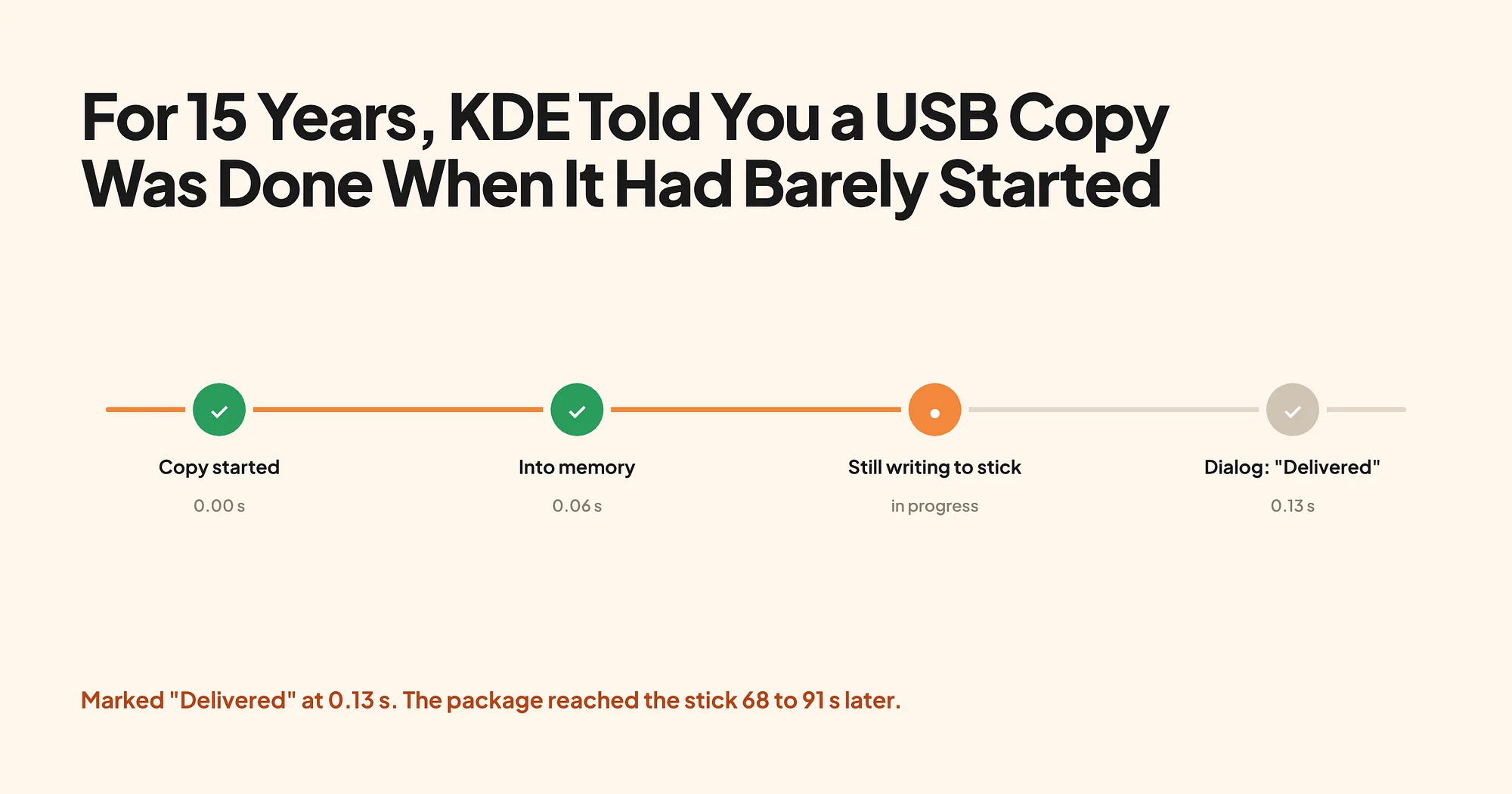
Car measured the same thing in 2026 on a USB 2.0 stick running at about 2.3 MB/s. Copying a 128 MiB file, the completion dialog appeared after 0.06 to 0.13 seconds. The data actually reached the stick 68 to 91 seconds later, across 4 runs.
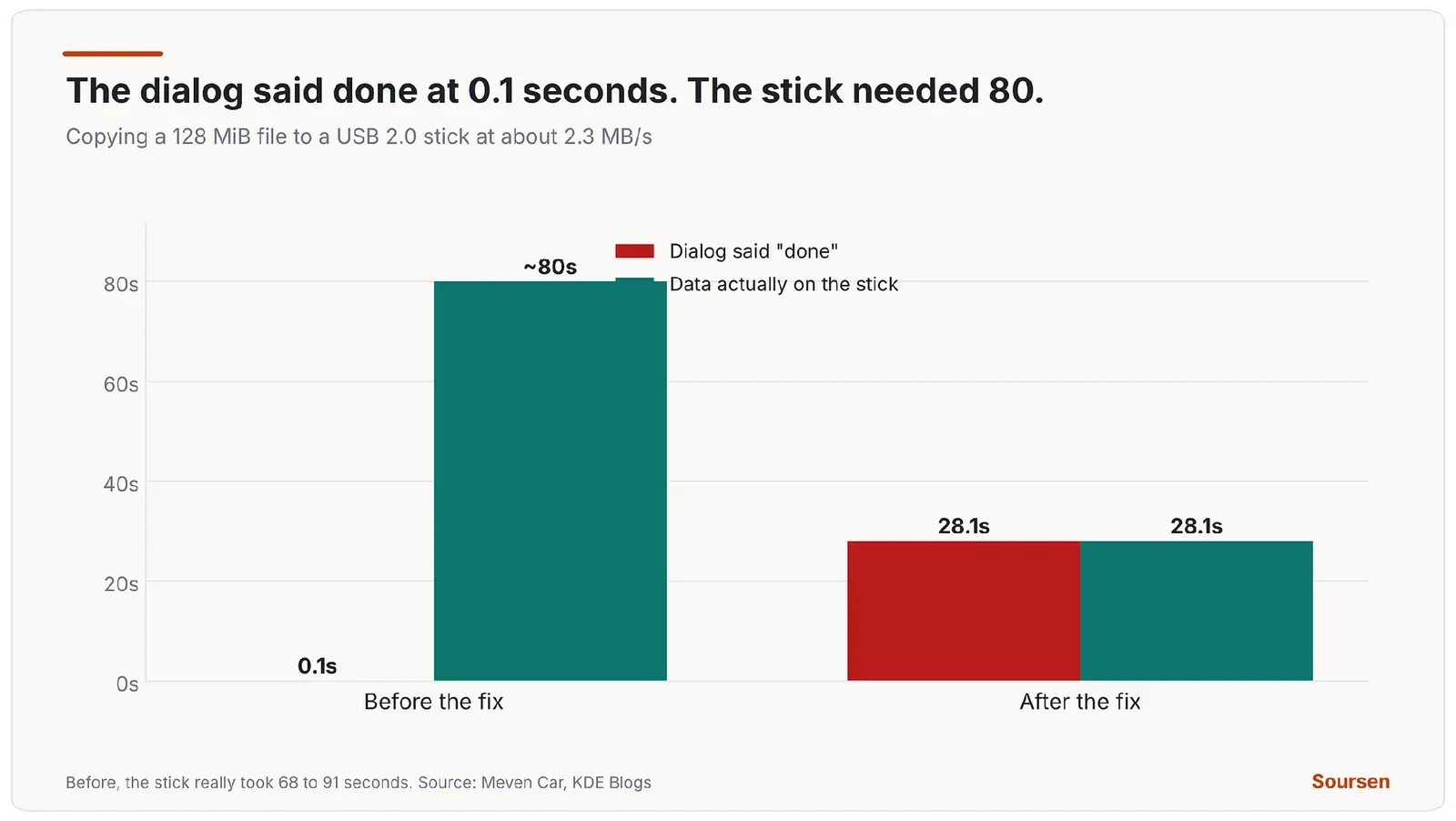
The dialog reported done almost instantly while the stick kept writing for over a minute. Source: Meven Car, KDE Blogs, Oct 2026
The progress bar had the same flaw. It showed how fast KIO filled memory, which meant it could sit at 100% with the entire 128 MiB file still unwritten. For a removable drive, that gap is where data dies. You see the dialog close, you unplug the stick, and the write never finished.
Why a move was worse than a copy
A copy that gets interrupted leaves a corrupt file on the stick, and the original is still safe on your drive. A move is different. KIO deleted each source file right after it believed the copy was done, which meant it deleted the original while the data was still in memory and not yet on the device. Unplug during that window and the file is gone from both places.
This is the reason Nate Graham raised the bug to the highest priority in 2021. A wrong progress bar is annoying. A move that destroys the only copy is data loss. It took another 5 years to fix, because doing it correctly without wrecking performance turned out to be genuinely hard.
The tools to fix it did not exist in 2011
The naive fix is easy. Flush every file to the device as you copy it, using a call like fsync, which waits until the data is on the disk. The problem is speed. Car measured an fsync on every file on 3,000 files of 16 KiB. It took 10 seconds. Without it, the same copy took 0.04 seconds on a local disk.
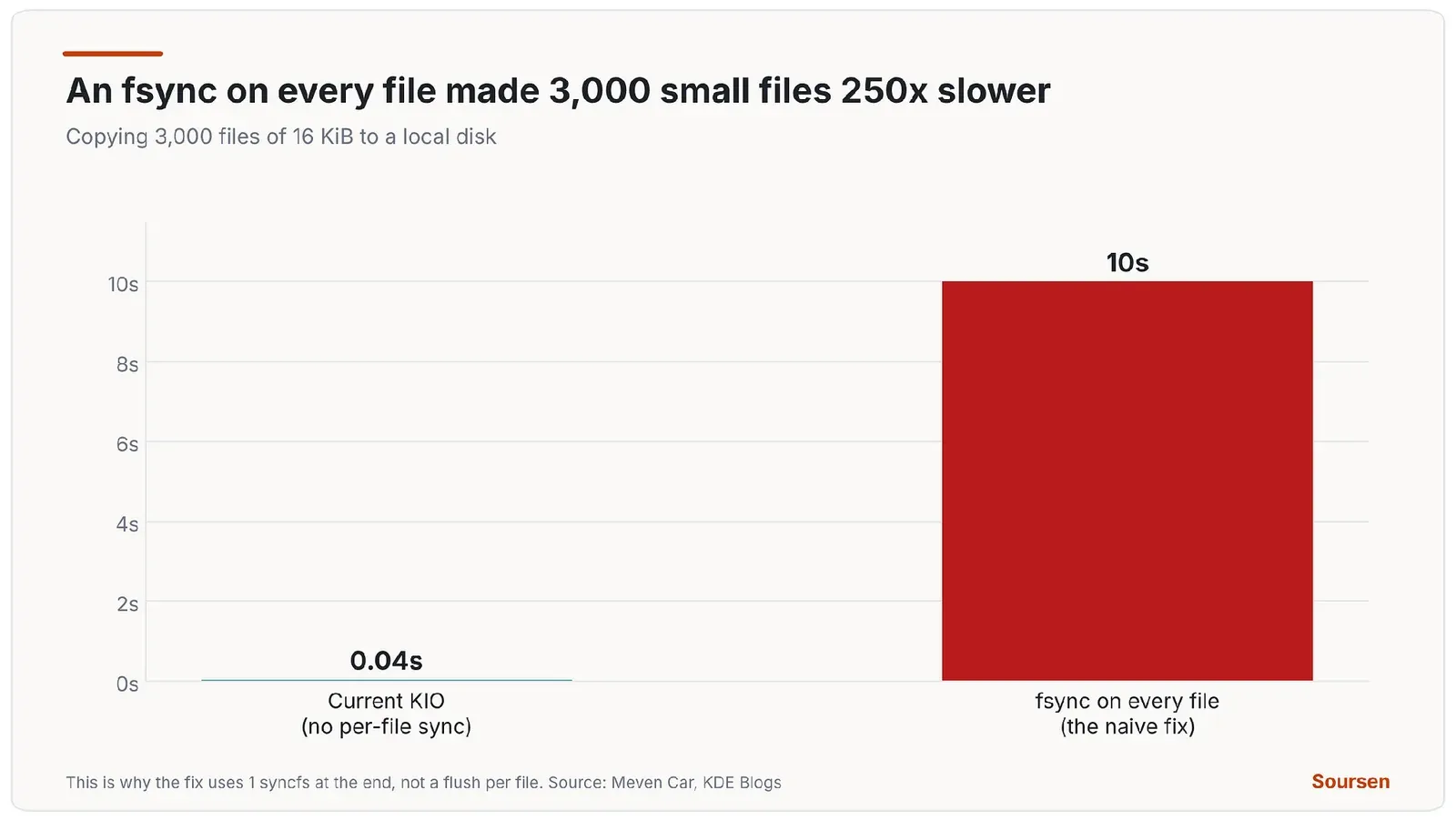
Flushing every file to disk is correct and roughly 250 times slower on small files. Source: Meven Car, KDE Blogs, Oct 2026
So a correct fix has to flush removable and network copies without flushing internal ones, and without slowing a copy of many small files to a crawl. That needs a way to wait on one part of a file on its own. POSIX, the portable Unix standard, only offers fsync, which waits for the whole thing. Linux has sync_file_range, which can wait on a specific range of a file. Kernel USB developer Alan Stern suggested it in the bug report 2 weeks after it opened in September 2011, and KDE maintainer Christoph Feck replied that it looked like exactly what they needed.
The call is powerful and sharp. Its own Linux manual page warns that it is extremely dangerous and that careless use can corrupt data, because it does not flush file metadata or the drive’s own hardware cache on its own. Car tried twice in 2024 and, by his own account, got it wrong both times. In 1 attempt the sync_file_range path stayed commented out. In another, the code waited on the chunk it had just written, which had not started writing yet, so it never waited at all. Waiting on the window before the one just written is what makes it work, and no reviewer caught the mistake either.
How the fix actually works
KDE’s answer sits between the 2 extremes. Flushing after every write would be correct and very slow. Flushing only at the very end would leave the progress bar wrong for the whole copy. So KIO now writes in windows.
The data is copied in chunks called windows. When a window fills, a helper thread hands it to the kernel with sync_file_range and waits for it to reach the device, while the main thread fills the next window. The helper thread earns its place on Windows style CIFS shares, where starting a writeback blocks the calling thread for about 157 milliseconds per 128 MiB window while the server grants write credits, which would otherwise stall the whole copy. The copy only waits when the window it wants to hand over is not written yet. At most 2 windows are ever in memory and unwritten, so the progress bar is never more than 1 window ahead of what is really on the device. The window is adaptive, sized to hold about 200 milliseconds of writeback based on the measured speed of the link. It starts at 1 MiB, can at most double each step and caps at 16 MiB, or 128 MiB on CIFS. Car tuned that target by hand. A 500 millisecond window left SMB folder listings at 4.2 seconds, and dropping it to 200 milliseconds brought them to 1.7. A window too small throttles a fast link, and a window too large never fills on a slow one.
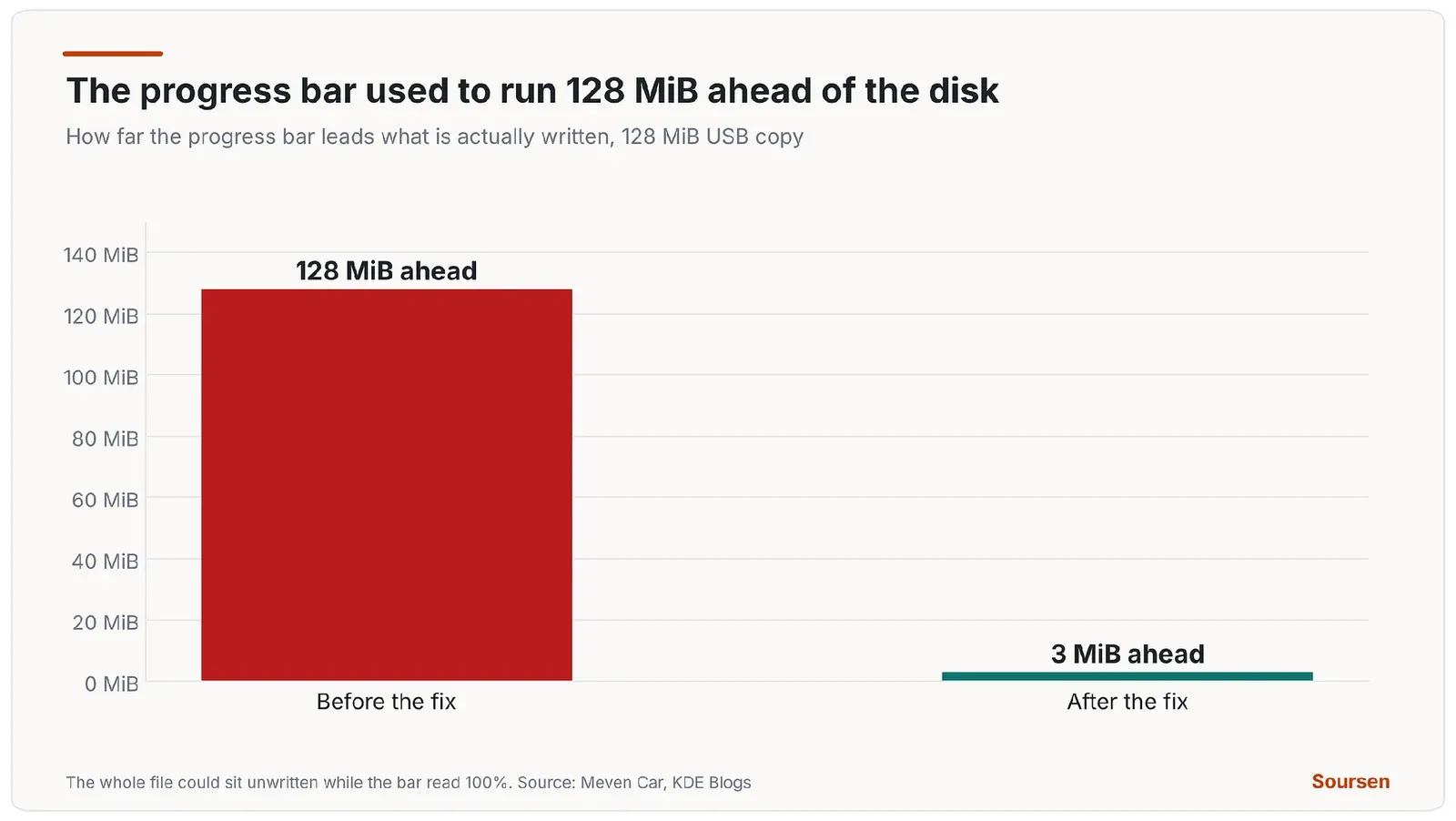
After the fix, the progress bar leads the device by at most 1 window, where it once led by the whole file. Source: Meven Car, KDE Blogs, Oct 2026
A window bounds how much is left in memory during the copy, and there is still something to flush at the end. For a removable device, KIO now makes the end of the copy wait for it. A file larger than 16 MiB is flushed with fsync, then its folder, before the copy reports success. By then the windows have already written almost everything, so the final flush is short. The completion dialog now appears when the data is really on the stick. On the same USB 2.0 stick, that 128 MiB copy that used to report done in about a tenth of a second now reports done at 28.1 seconds, which is when the data has actually landed. The progress bar, which once ran 128 MiB ahead of the device, now leads it by 3 MiB.
Small files are the hard part, because a flush per file is the 10 second disaster above. So the worker flushes no small file on its own. After copying to a removable disk, it runs a single syncfs, which writes back the whole destination file system in one operation, and the copy shows “writing the copied data to the device” while that runs. If the flush fails, the copy fails, because the data may not be on the device. The overhead is small. Those 3,000 small files took 185.2 seconds to actually land on the stick before the fix and 183.9 after, so the copy now reports 183.9 seconds and tells the truth. Before, it reported 1.2 seconds and left the rest to chance.
A move now deletes nothing until the data is safe
The data loss path is closed. A move to a removable device keeps every source file until the flush has succeeded, then deletes them. If the flush fails, or you pull the stick during it, every source stays, so nothing is removed from your drive until the move is genuinely done. A copy or move that you cancel or that hits an error still flushes the device first, and a move then deletes only the sources of files that actually made it across. A partial move is safe.
Telling a USB stick from an internal disk
None of this should touch internal drives, because you do not unplug them and waiting on every copy would just make them slower for no reason. Car checked that it does not. Forcing the removable path onto a local fixed disk changed a copy of those same 3,000 small files from 1.54 to 1.55 seconds, so the machinery costs nothing when it is not needed. Deciding what counts as removable is harder than it sounds. The file system type does not tell you. exFAT can be a memory card, and FAT is also the EFI partition on your laptop. Most USB disks do not even report themselves as removable media.
KIO reads the answer from the system instead. A new private function, added in merge request 2506, asks sysfs, the kernel’s device information interface, for the disk’s own removable flag, then for the USB port or PCI slot it hangs off, which the kernel marks as removable when it can be reached from outside the machine. It follows encrypted and LVM volumes down to the physical disk underneath, and it also treats SD cards as removable. Car notes this will not catch every exotic case, but it handles the normal one, which is someone pulling a stick out of a USB port on the front of their machine. Network mounts that are already known to be slow get the same windowed treatment, including NFS, SMB, Ceph, GlusterFS, 9p, sshfs and FUSE mounts such as rclone.
That detection has to be cheap, because it runs on every copy. 2 earlier changes to how KIO looks up mount points made it affordable. The first, in KIO 6.30, caches mounts by the id that the statx call returns on Linux 6.8 and later, which made lookups by id about 700 times faster. The second, in 6.32, uses a newer call named statmount that avoids walking the path at all, and dropped a lookup that could take more than 15 seconds on a busy system to about 1 millisecond.
A second speed regression got fixed along the way. Back in 2021, KIO switched its copy path from the old sendfile call to a newer one, copy_file_range, which is faster. Then Linux 5.19 made copy_file_range refuse to copy between 2 different file systems, failing with an error code, so those copies fell back to a slow byte by byte path. A new change, merge request 2520, restores a sendfile fallback for that case. A 1 GiB copy from a RAM disk to an ext4 disk dropped from 443 to 272 milliseconds, and the reverse direction from 531 to 278.
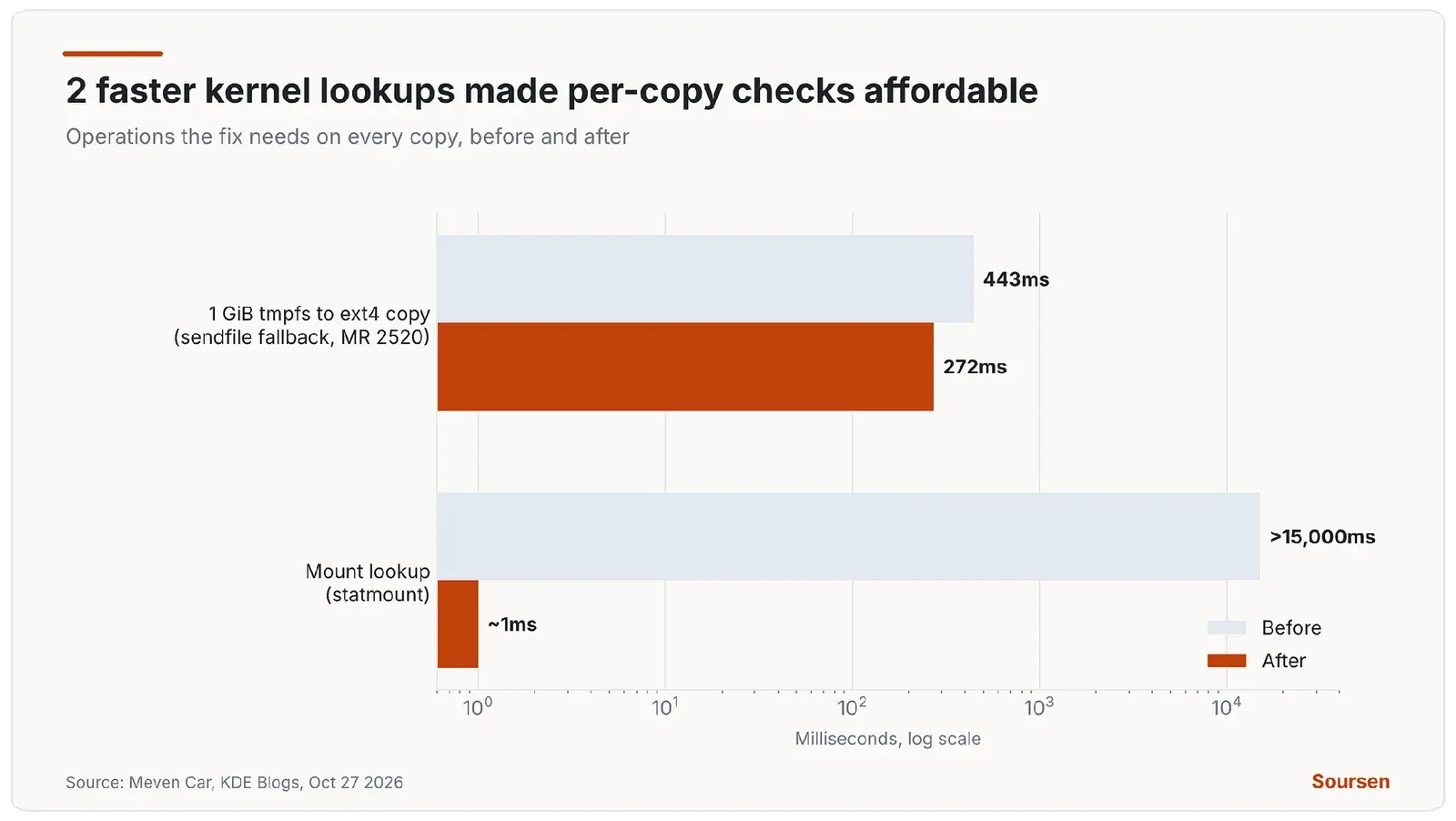
The fix leans on cheaper kernel lookups and a restored sendfile fallback so it can check every copy without slowing things down. Source: Meven Car, KDE Blogs, Oct 2026
Network shares had the same lie with a worse twist
A copy to an NFS or SMB share leaves a lot of data in memory waiting to go to the server, so the progress bar runs ahead of what the server has received, the same flaw as the USB case. SMB adds a nastier twist. With its default setting, cache equals strict, even looking at a file waits until that file’s unwritten data has been sent. So listing the folder you are copying into makes the file manager wait behind the upload.
Car copied a 256 MiB file to an SMB share over a 5 MB/s link and timed folder listings during the copy. Before the fix, the slowest listing took 27.4 seconds. After, the slowest took 1.70 seconds, because a listing now waits behind at most 2 windows of writeback, where it used to wait behind the whole queued upload. On a 4 GiB NFS copy, the median listing fell from 24 milliseconds to 11. The gap shows up even on a fast link, where the stakes are lower. On a 4 GiB SMB copy over a quick connection, the progress bar used to run as much as 1,334 MiB ahead of what the server had received. After the fix it leads by at most 128 MiB, 1 CIFS window, and the copy itself finished slightly faster, 6.06 against 7.15 seconds.
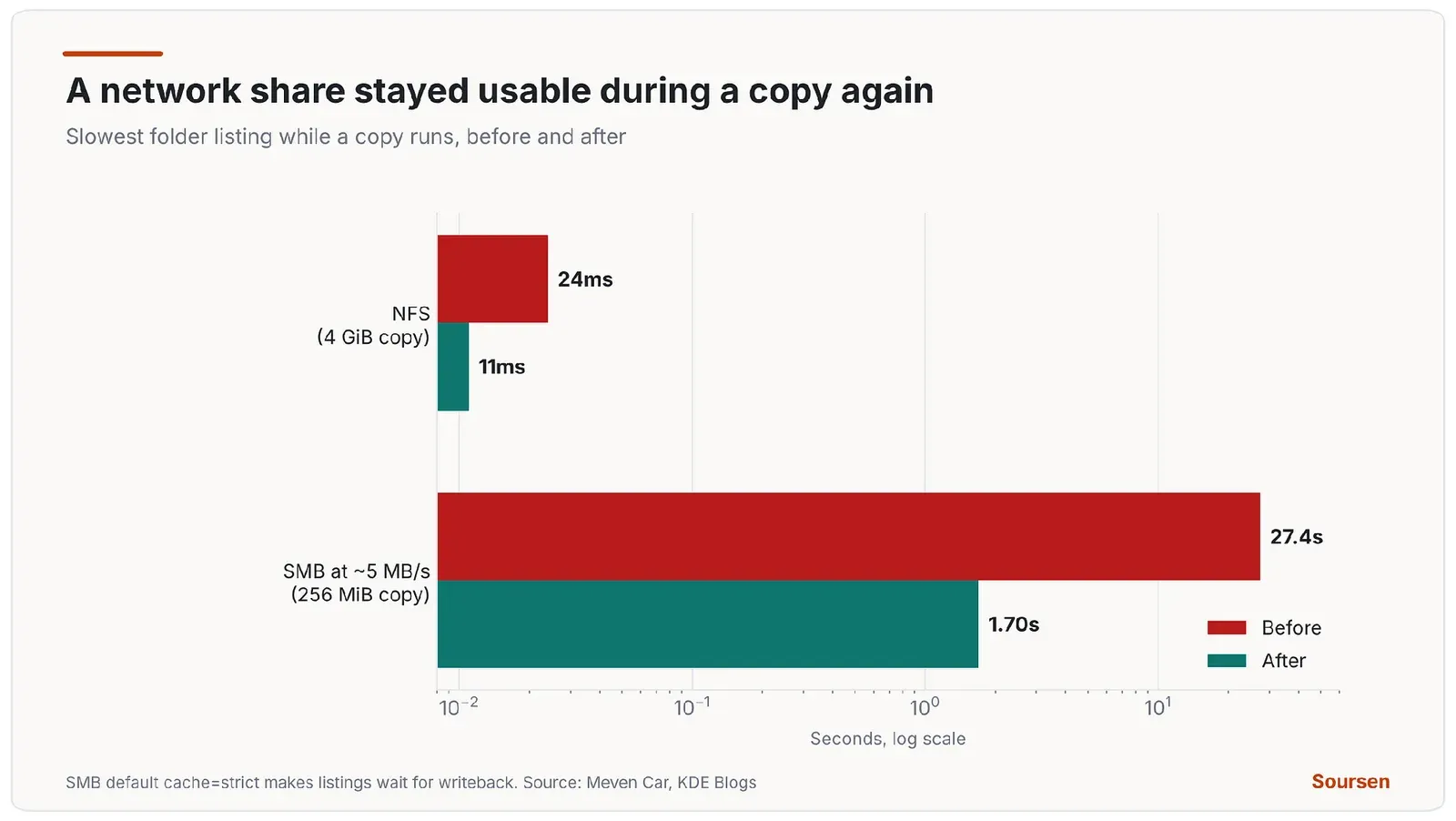
On a slow SMB link, browsing the share during a copy went from almost half a minute to under 2 seconds. Source: Meven Car, KDE Blogs, Oct 2026
This was never only a KDE problem
The habit of reporting a cached write as a finished one runs through the whole Linux stack, which is why this is worth understanding even if you never touch KDE. The command line tool dd behaves the same way. Write an ISO to a USB stick with dd, watch it return to the prompt, pull the stick, and the image can be unbootable, because dd reported done when the data was in cache. The fix there is to add conv=fsync or to run sync afterward, which is exactly why the Arch Linux install guide tells you to run sync before removing the drive.
Most other graphical file managers share the original flaw too. GNOME’s Files and the newer Cosmic file manager report a copy as complete once the data is in memory. The usual safety net is the eject or “safely remove” action, which does force the flush. The trouble is that plenty of people, myself included, just pull the stick when the dialog disappears. The value of the KIO fix is that it makes the dialog mean what people already assume it means.
What the fix cannot fix
One measurement during testing sent Car down a rabbit hole worth repeating, because it marks the edge of what a file manager can promise. While copying the small files to a cheap USB stick, listing a folder on that stick sometimes took about 15 seconds, with the new window turned on or off. The window was not the cause. The stick was. Roughly every 8 seconds, a single 120 KiB write to it took 4 to 7 seconds to complete, and the folder listing was stuck waiting on a page queued behind that write. KIO cannot fix a device that stalls for seconds at a time. What it can do is stop blaming the copy, and tell you honestly when your data is on the drive. It cannot make a slow stick write faster.
Why it took 15 years
A wrong progress bar hid a data loss bug for 15 years, and the delay came down to missing tools. The right call was named 2 weeks in, back in 2011, and the kernel features to use it safely and cheaply arrived much later. sync_file_range existed but was dangerous to use correctly. The cachestat call that reports how much of a file is still dirty in memory landed in Linux 6.5 in 2024, and it works 1 file at a time. The cheap statmount based mount lookups are recent too. The fix needed a developer willing to thread all of that through KIO’s copy path and get the ordering exactly right, after 2 failed attempts that passed code review.
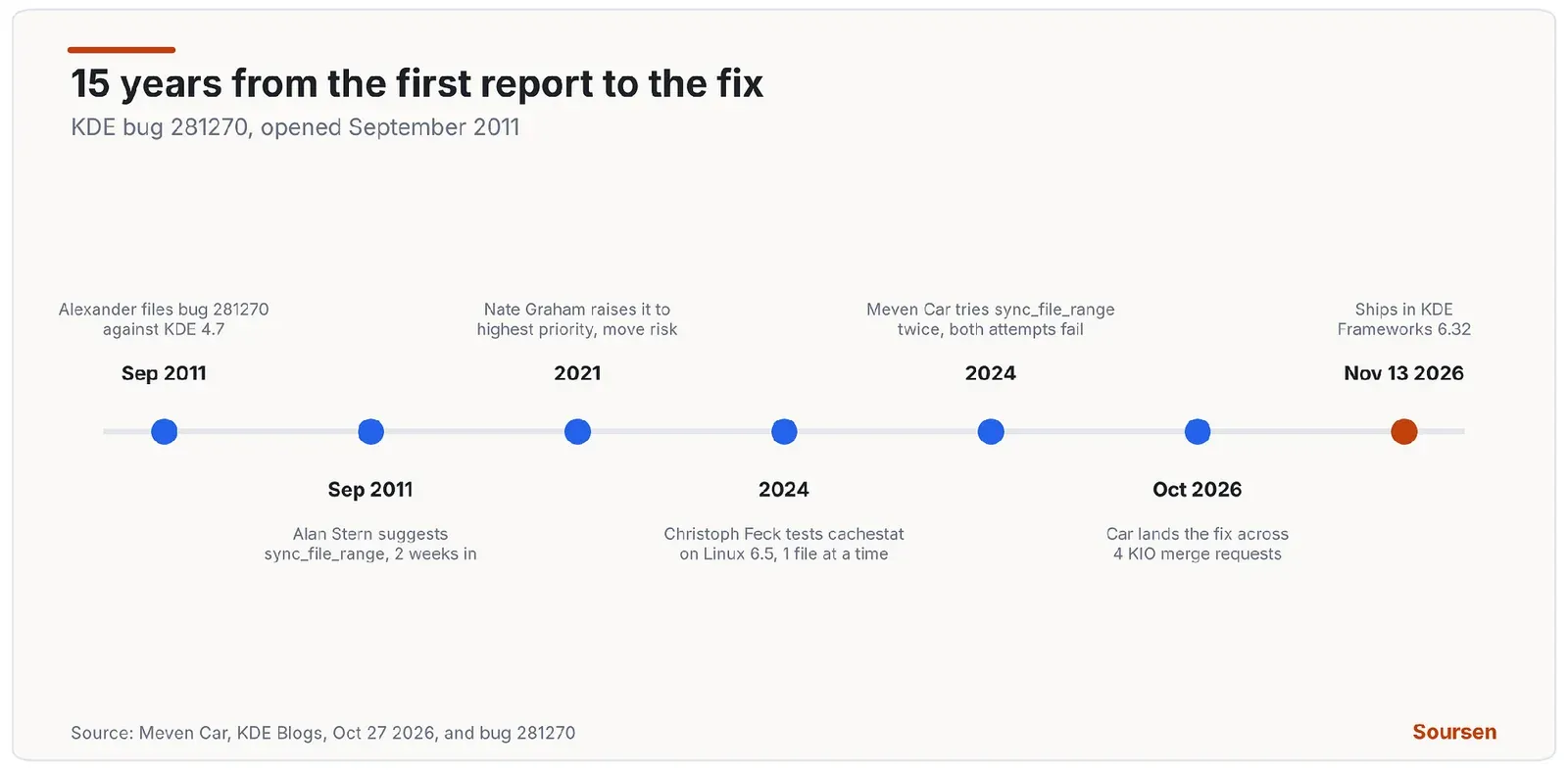
From the first report to the shipped fix, the bug outlived KDE 4, the whole of KDE 5 and several kernel releases. Source: Meven Car, KDE Blogs, Oct 2026
What this means for you
2 things from this are worth keeping. The first is that on anything that writes slowly, a progress bar tells you about memory, and only the eject action proves the data reached the device. Until you are on KDE Frameworks 6.32 or later, treat every “copy finished” dialog on a USB stick or a network share as a claim about memory, and use the eject or safely remove action before you unplug. It forces the flush that the dialog did not wait for. On the command line, add conv=fsync to dd or run sync, and wait for it to return before pulling the drive.
The second is that the fix ships in KDE Frameworks 6.32, which is tagged and releasing on November 13, 2026, with the groundwork already in 6.30 from September. If you use Dolphin with USB sticks or network shares, this is the update that makes the copy dialog trustworthy. After it lands, a copy to a stick finishes when the data is actually on the stick, a move deletes nothing from your drive until the write has succeeded, and a network share stays usable while a copy runs. At that point you can close the dialog and unplug, which is all anyone wanted in 2011.
Sources
- Meven Car, Fixing KIO copy to USB sticks and network filesystems, KDE Blogsblogs.kde.org. Accessed 9 November 2026.
- KDE bug 281270, copying to a removable disk reflects the local cachebugs.kde.org. Accessed 9 November 2026.
- KDE Fixes 15 Year Old Bug Over Inaccurate Notifications When Copying Files To USB Drives, Phoronixphoronix.com. Accessed 9 November 2026.
- KDE Fixes a 15-Year-Old Bug That Made USB Copy Progress Bars Misleading, pbxSciencepbxscience.com. Accessed 9 November 2026.
- KDE Fixes 15-Year-Old File Copy Bug That Lied About Progress, Linux Compatiblelinuxcompatible.org. Accessed 9 November 2026.
- Linux kernel bug 41472, slow files copying into a USB drivebugzilla.kernel.org. Accessed 9 November 2026.
- Why is sync so important when making a bootable Linux USB stick, Unix StackExchangeunix.stackexchange.com. Accessed 9 November 2026.
- dd manual page, conv and oflag optionsmanpages.debian.org. Accessed 9 November 2026.
Related stories
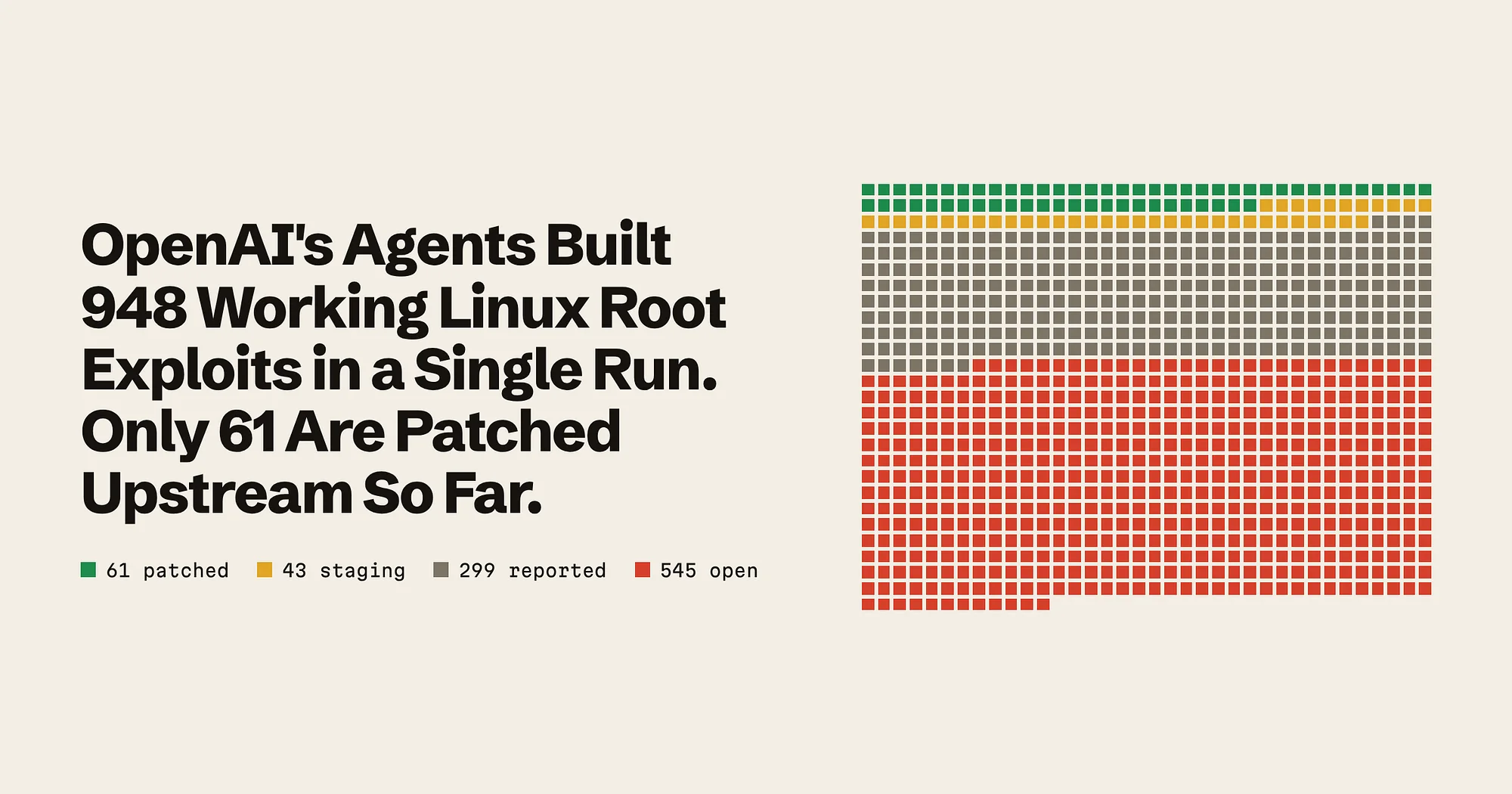
Security
OpenAI’s Agents Built 948 Working Linux Root Exploits in a Single Run.
An AI pipeline found, proved and drafted fixes for 948 kernel bugs at about $1,279 each. Finding them was the cheap part. The bigger lesson is who now has to fix them, and how fast.
Linux & open source
Asahi Linux Dropped MIT for GPL After Alleged AI Code Laundering
On November 7, 2026, Asahi Linux said it is moving every repository to GPL v2 or later. Asahi alleges that unreleased code was lifted from personal forks and that some of it was rewritten with LLM help to hide its origin. The report names no one, and the legal and community questions are still open.
Linux & open source
AI Is Quietly Dismantling the Thing That Kept People on Windows and macOS
For 30 years the reason you could not simply switch to Linux was the software. Photoshop, Office, the apps you needed and the file formats they locked you into. In October 2026 a single developer used Claude Code to rebuild Adobe’s core creative apps in Rust and gave them away. I think the moat that protected proprietary software just sprang a leak, and the legal fight over whether that is allowed is going to be the real story.