You Can Build a Serious Home Server for About $1,000, and It Solves a Problem Your Phone Cannot
A used enterprise server that cost a company thousands of dollars new sells for around $250 today, and with a few parts you have a private cloud that runs AI agents, stores your photos, records your cameras, and lets you walk through an airport with a phone that holds almost nothing. I went through the exact parts, the real prices in the current memory shortage, and what to actually run on it.
Last verified Also on Medium
On this page
- Why keeping data off the phone actually works
- Why a used server, not a new PC
- The base machine
- Memory, the expensive part
- Storage, a split strategy
- What it all costs
- The running cost nobody mentions
- When a quieter, smaller machine is the better call
- The operating system that makes it a cloud
- What to actually run on it
- The travel security workflow
- Reaching it from anywhere
- If you are not ready to buy a server
Your phone is the weakest point in your privacy. At a border crossing, an officer in many countries can compel you to unlock it, and whatever is on it is theirs to read. One answer is to carry a phone that holds almost nothing, your data living on a server at home that you reach over an encrypted connection, and that you can disconnect from entirely while you travel. The piece that makes this work is a home lab server, and the surprising part is how cheap a genuinely powerful one has become. You can build it for around $1,000, even with memory and storage prices as high as they are right now.
I run several of these. The machine at home is larger than most people need. What follows is the build I would recommend to someone starting out, with the actual parts, roughly current prices, and the software that turns a bare server into your own private cloud.
Why keeping data off the phone actually works
The strategy rests on a legal distinction that is easy to miss. A border officer’s search authority covers what is physically on the device, call history, texts, contacts, photos, videos, the files saved to the phone itself. It does not extend to data sitting only on a remote server. In the United States, CBP stated this directly in a 2017 letter from its acting commissioner to Senator Ron Wyden, confirming that a border search does not reach information located solely in the cloud, including email and social media content that lives on remote servers. Officers can search a phone without a warrant or suspicion in most cases, but only the content stored on it.
That is the whole basis for moving your data home. If your photos, messages, and files live on a server you control and the phone holds almost nothing, then a device search finds almost nothing, because the data is not on the device to find. You also do not have to hand over passwords, though refusing can mean the phone gets detained. Rules differ by country and change over time, and the Electronic Frontier Foundation keeps current guidance worth reading before you travel. The point is that the architecture, data at home, thin phone in hand, lines up with where the legal line actually sits.
Why a used server, not a new PC
A new computer with real power is painful to buy right now, because memory and SSD prices have gone vertical. DDR4 memory rose more than 50% in a single quarter in 2026, and SSDs are climbing on the same pressure, as manufacturers divert capacity to the chips feeding AI data centers. Building a fresh high spec desktop in this market is expensive.
Used enterprise servers are the way around it. These machines were built to run in data centers, they are far more powerful than a consumer laptop of the same age, and large companies dump them on the secondhand market when their leases end, usually after 5 to 8 years. A server that cost thousands new sells for a few hundred dollars today. The catch is that a server is not built like a desktop. It has no monitor or keyboard, it runs headless in a closet or a garage, and it is loud, 8 fans at full tilt sound like a small aircraft. Put it somewhere the noise will not bother you and that stops mattering.
The base machine
The server I would pick is the Dell PowerEdge R640, a 1U rack server from the 5 to 8 year old range. It takes 2 processor sockets, and the ones you want are a pair of Intel Xeon Gold CPUs, which together give you dozens of cores. It holds up to 24 memory modules for a maximum of 3 TB of RAM, and has up to 10 front bays for 2.5 inch drives. That is far more machine than a home setup needs, which is the point, there is enormous room to grow.
On eBay you can find a bare R640 for around $238. Bare means it comes with the case, the 8 cooling fans, 2 power supplies rated 750 to 1,000 watts each, and the 2 CPUs, but no memory and no drives. Read each listing carefully, because what is included varies, and the network card it ships with is often a high speed 25 gigabit data center card that your home router cannot use. You want a plain 1 gigabit network card instead, which costs about $22 and works with any home router.
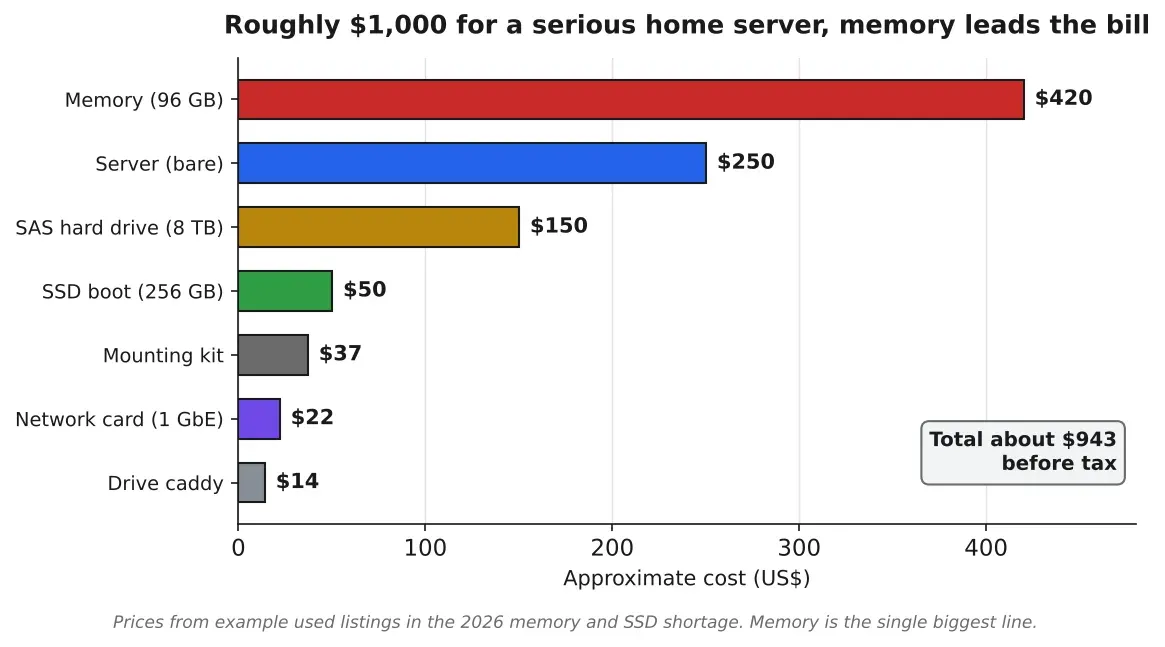
Figure 1. What goes into the roughly $1,000 build. The bare server with its 2 Xeon CPUs is a small share of the cost, and memory is the single most expensive line in the current shortage. Source: Author chart based on example eBay listings, 2026
Memory, the expensive part
The R640 comes with no memory, so you buy modules that fit, and in this market this is the line that hurts most. The reasonable choice is 16 GB DDR4 RDIMM 2133 modules, which are plentiful on the used market and therefore still affordable at roughly $60 or more each, far below the jump in newer DDR5 prices. 6 of them give you 96 GB, a good starting point that runs plenty of virtual machines with room to expand.
One rule matters here. The server has 2 CPUs, and each should get an equal amount of memory, so you install modules in matched sets, 3 sticks of 16 GB per CPU in this case. You can grow the same size module up to a maximum of 384 GB later, or move to 32 GB sticks if you want to go further. At current prices, budget around $420 for the starting 96 GB.
Storage, a split strategy
The storage approach saves real money and avoids a common mistake. Use a small, brand new SSD as the boot drive, and cheap magnetic hard drives for the bulk storage. The reason is that SSDs wear out under heavy writes and have a limited lifespan, so a used one that has been hammered in a data center can fail on you. A magnetic drive is built to run 24/7 for years and does not wear the same way, so a used magnetic drive is a safe buy.
For the boot drive you want a 2.5 inch SATA SSD, brand new. A 256 GB model runs about $50, and 500 GB if the budget allows. The boot drive only holds the operating system, which is mostly read and rarely written, so a modest SSD is all you need. For mass storage, use 2.5 inch SAS magnetic drives. A 2 TB drive is inexpensive, and an 8 TB is barely more, so you can start with one and add more into the empty bays over time. Each drive needs a caddy, a tray that slots it into the front of the server, at about $14 for the 2.5 inch kind, and you only need 2 to begin, one for the SSD and one for the hard drive. If you want the empty bays to look tidy, blank covers run about $5 for a set.
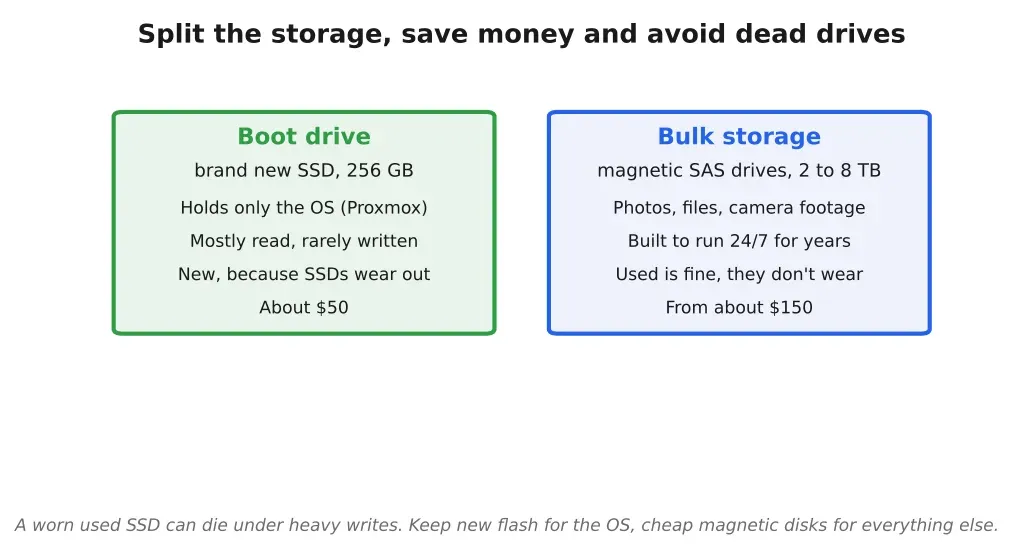
Figure 2. The storage split that keeps cost down and reliability up. A brand new SSD holds the operating system, which is mostly read, while cheaper magnetic drives handle bulk storage and are built to run constantly for years. Source: Author diagram of the boot plus bulk storage approach
What it all costs
Add it up and the numbers land close to the target. The server is about $250, memory about $420, the 1 gigabit network card $22, the SSD $50, a SAS hard drive $150, a caddy $14, and an optional mounting kit $37. That totals $943. Add tax and you are still near $1,000. The power cord is effectively free, because you use any standard computer cord you have lying around, the data center cords the server ships with are not made for a home outlet.
What you end up with is a rack server with 2 Xeon processors, dozens of cores, 96 GB of RAM, a 256 GB SSD, and 8 TB of hard drive storage. I would comfortably run 10 virtual machines on that at once without the machine straining, though it will still roar like a jet while it does.
The running cost nobody mentions
The purchase price is only part of the bill. A 1U server like this runs 24/7, and these machines idle somewhere around 100 to 180 watts, climbing higher under load. At a US electricity rate near $0.14 per kWh, a used rack server left on all day costs roughly $20 to $90 a month to run, depending on the hardware and how hard you push it. Over a year that can quietly exceed what you paid for the server, so it belongs in the budget from the start. If your power is expensive, this changes the math more than the sticker price does.
Noise is the other cost. The small, fast fans in a 1U chassis are loud, especially at boot, which is why a closet, garage, or basement is the right home for one. A 2U server with larger, slower fans is noticeably quieter for the same work, and a tower server quieter still, idling around 35 to 45 decibels, closer to a normal desktop. If the machine has to live in earshot, that tradeoff is worth paying for.
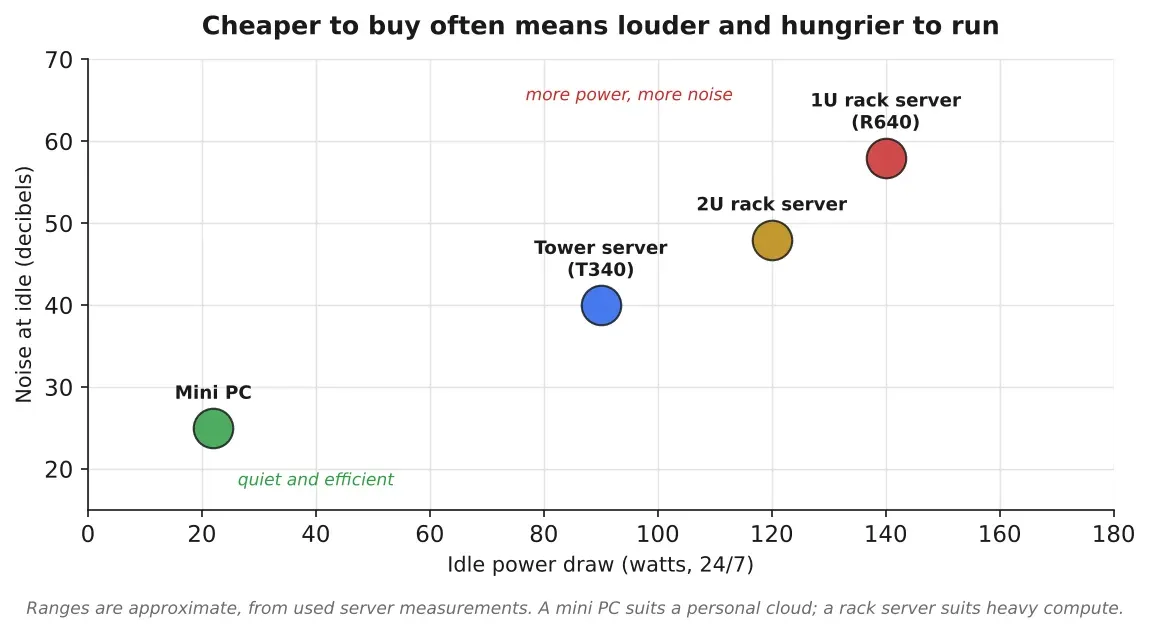
Figure 3. The 2 ongoing costs of a home server, power and noise. A 1U rack server is cheapest to buy and loudest to live with, while tower servers and mini PCs cost more per unit of power but are quiet enough for a room you use. Source: Author chart based on used server power and noise ranges
When a quieter, smaller machine is the better call
A loud 1U server is not for everyone, and there are 2 honest alternatives. A tower server, something like a Dell T340, does similar work at living room noise levels and fits under a desk, for a somewhat higher price. A mini PC draws a fraction of the power, 15 to 30 watts against about 150 for the rack server, makes almost no noise, and handles a Nextcloud instance, backups, and a couple of light virtual machines without complaint. What a mini PC gives up is headroom, it will not run 10 virtual machines or record several 4K camera streams at once. If your goal is the travel privacy setup and a personal cloud, a mini PC may be all you need, and it will cost you a few dollars a month to run. The big rack server earns its place when you want compute to grow into, running local AI models, recording several cameras, and hosting many services at once.
The operating system that makes it a cloud
The software that turns this into a private cloud is Proxmox, a free Linux distribution built to run virtual machines. You install it once from a USB stick, using a display and keyboard only during that initial setup, and after that the server runs headless. You control everything from a browser on another computer. Proxmox lets you run many separate virtual machines on the one box, each behaving like its own computer, so a single server can act like 10.
There is an easy path and a hobbyist path here. If you enjoy the tinkering, install each service by hand and learn how it works. If you would rather skip the deep configuration, set up one virtual machine running an AI agent, point it at a cloud model subscription for around $20 a month, and let the agent install and configure the rest for you. The only real effort then is standing up that first agent machine.
What to actually run on it
A handful of free, self hosted applications cover most of what people want.
Nextcloud is your own replacement for iCloud, Google Drive, and OneDrive, holding your photos and files on your own hardware, not a company’s. This is the heart of the travel strategy, because if your photos and messaging data live in Nextcloud, you can delete the Nextcloud app from your phone before a border and there is nothing on the device pointing to where your data is. Home Assistant runs your home automation and, more usefully, your security cameras, recording 24/7 footage from several 4K cameras straight to the server, which has plenty of space for it. Syncthing handles continuous backups of your phone’s photos and files, so the device can be wiped at any time without losing anything. An AI agent running locally can tie these together, and paired with Home Assistant’s voice interface you can speak to it and have it control lights, cameras, and the rest.
The travel security workflow
Here is how the pieces combine into the border crossing use case. Say your private conversations are on Signal. Before you fly, you back up Signal to your home server, verify the backup worked, then delete Signal from your phone, along with the media on the device, which your server has already been backing up automatically. You also remove the remote access app, so nothing on the phone reveals that a home server exists. You cross the border with a phone that holds almost nothing. On arrival, you reinstall Signal and restore it from the backup, and reconnect to your server.
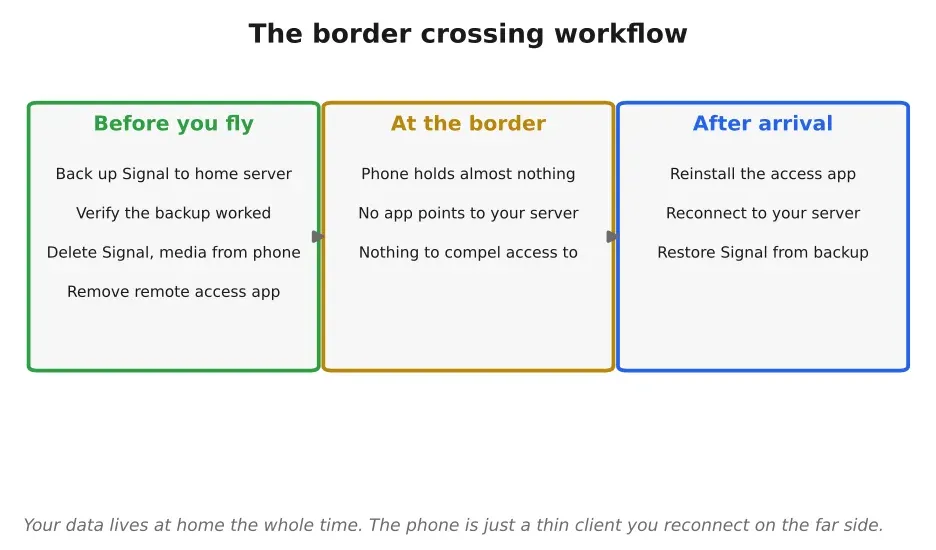
Figure 4. The travel workflow. Before crossing a border, your data moves to the home server and the apps come off the phone, so the device reveals nothing. After arrival, you reconnect and restore. Source: Author diagram of the travel privacy workflow
Reaching it from anywhere
The connection that makes all of this usable from the other side of the world is Tailscale. You register the server and each virtual machine on it with Tailscale, then install Tailscale on your phone, and every device behaves as though it is on the same local network no matter where you physically are. You get a private address for each machine, visible only to you, and you reach your private cloud over an encrypted link as if you were sitting at home. While traveling through a border, you remove the Tailscale app too, then reinstall it on the far side.
If you are not ready to buy a server
You do not strictly need to buy anything. If you have an old laptop sitting unused, you can install Proxmox on that and start smaller. The reason I still recommend the full server is value, given a choice between buying a new laptop and buying this far more powerful server for the same roughly $1,000, the server is the better machine by a wide margin, and it leaves room to grow into. The point is to lean less on your phone for your security, and a machine you control at home is how you do that.
Sources
- Dell EMC PowerEdge R640 review, StorageReviewstoragereview.com. Accessed 23 October 2026.
- DDR4 RAM prices rose over 50% in Q3 2026, TweakTowntweaktown.com. Accessed 23 October 2026.
- Proxmox Virtual Environment, Proxmoxproxmox.com. Accessed 23 October 2026.
- Nextcloudnextcloud.com. Accessed 23 October 2026.
- Home Assistanthome-assistant.io. Accessed 23 October 2026.
- Syncthingsyncthing.net. Accessed 23 October 2026.
- Tailscaletailscale.com. Accessed 23 October 2026.
- Border Patrol says it is barred from searching cloud data on phones, NBC Newsnbcnews.com. Accessed 23 October 2026.
- Border searches of electronic devices, Electronic Frontier Foundationeff.org. Accessed 23 October 2026.
- Best used enterprise servers for home labs, Ovrclockovrclock.com. Accessed 23 October 2026.
Related stories
Infrastructure
Are Data Centers a Good Deal for the Communities That Host Them?
We have been talking about the cloud as though it were an abstraction for years. Clean, invisible, frictionless, somewhere up there. The actual picture is less romantic.
AI & GPU compute
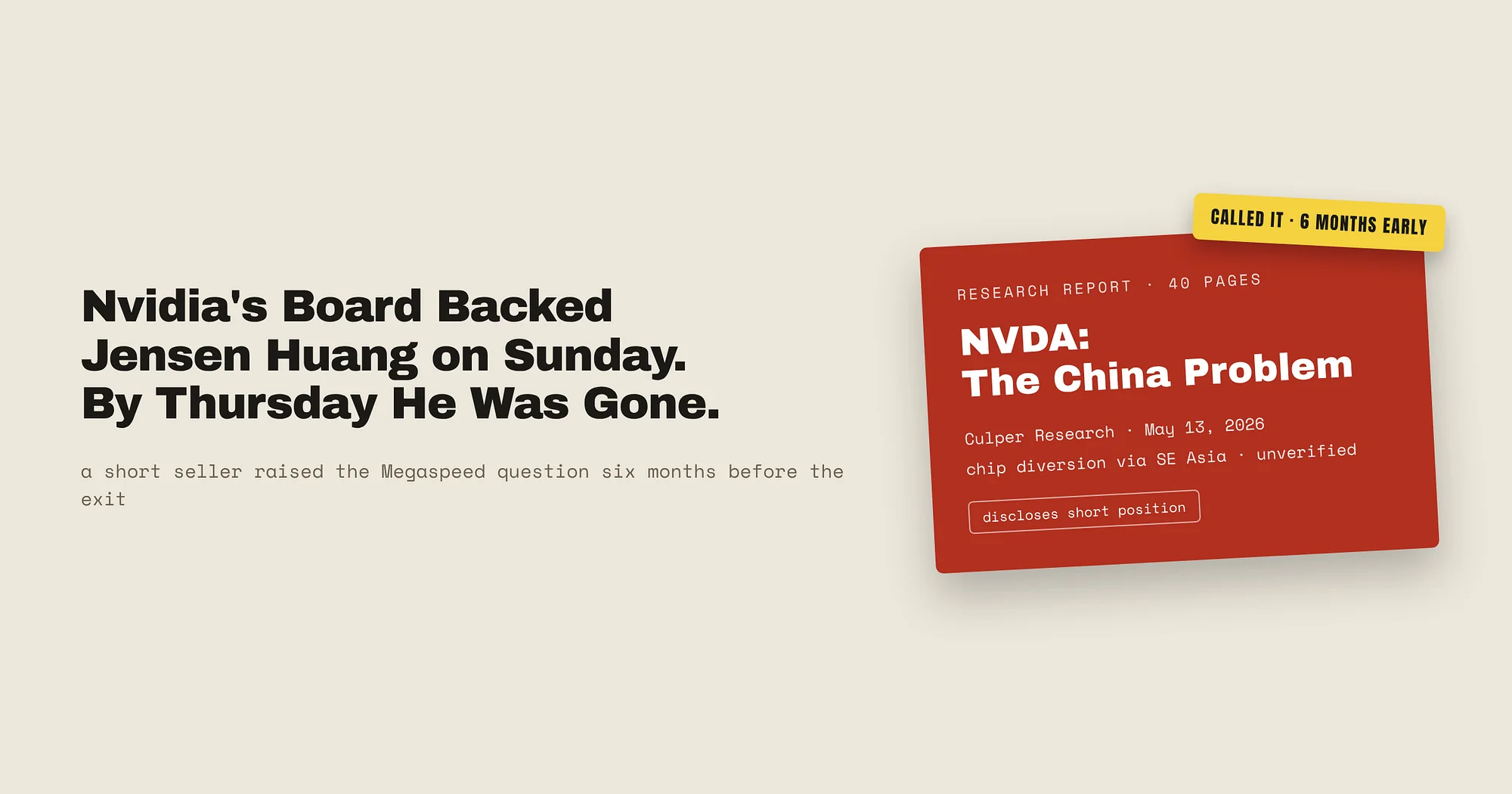
Nvidia’s Board Backed Jensen Huang on Sunday. By Thursday He Was Gone.
Four days after Nvidia’s board said it had confidence in its CEO, Jensen Huang resigned. A short seller had flagged the Megaspeed connection 6 months earlier, and most of the story rests on anonymous US officials, so I separate the filed facts from the allegations.
AI & GPU compute
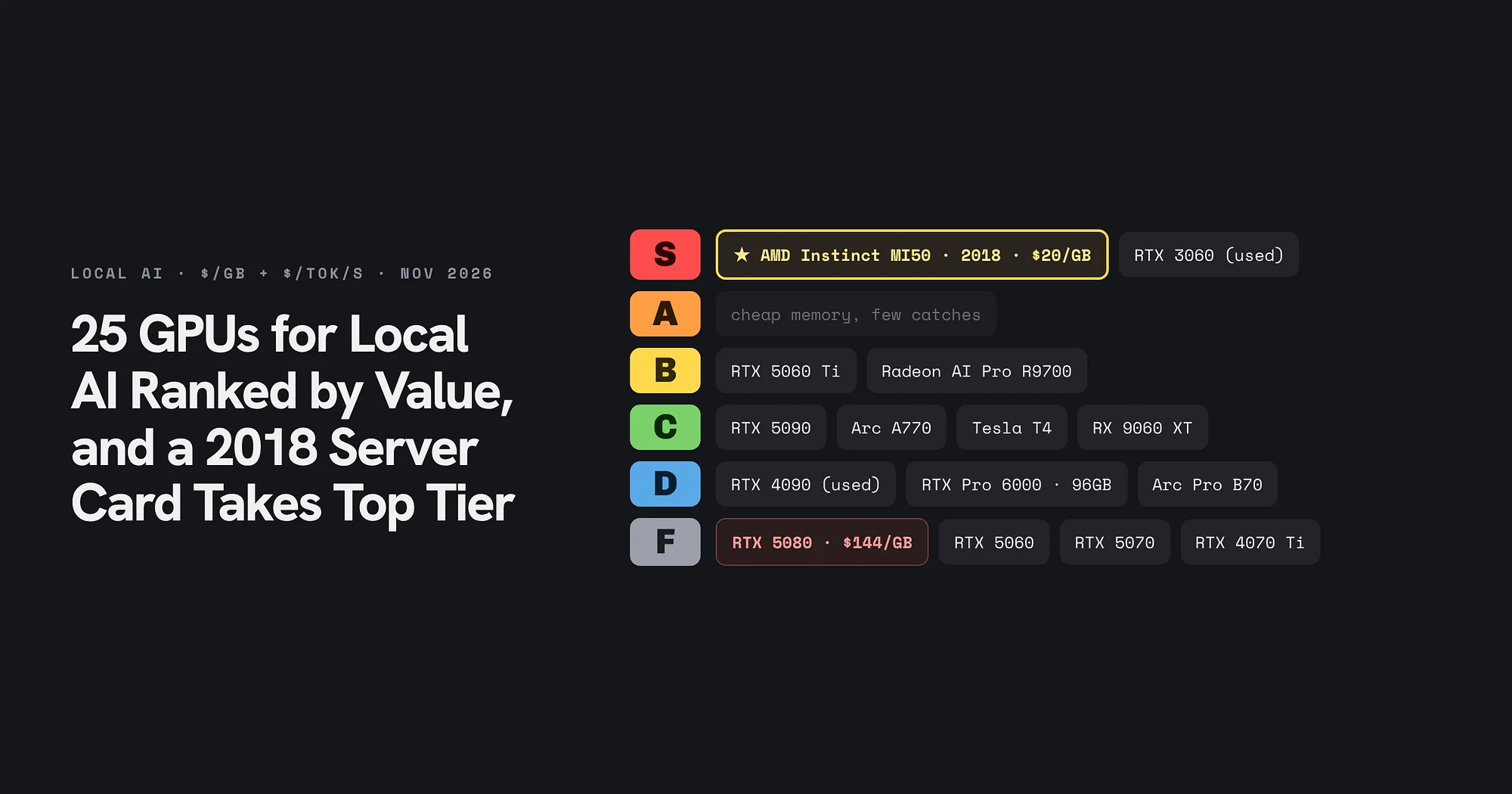
25 GPUs for Local AI Ranked by Value, and a 2018 Server Card Takes Top Tier
A November 2026 price snapshot grades 25 cards on dollars per gigabyte and dollars per token per second. The AMD Instinct MI50 and a used RTX 3060 take S tier, the RTX 5080 lands in F, and memory decides almost every grade.